ConfigureDefender utility for Windows 10/11

Andy Ful

From Hard_Configurator Tools
Thread author
Verified
Honorary Member
Top Poster
Developer
Well-known
Forum Veteran
Dec 23, 2014
10,021
1
65,916
8,398
65
Poland
Post updated in December 2025

ConfigureDefender utility for Windows 10/11.

New stable version 4.1.0.0 is available on the developer website (updated in February 2025):
https://github.com/AndyFul/ConfigureDefender

Softpedia:
https://www.softpedia.com/get/PORTABLE-SOFTWARE/System/System-Enhancements/ConfigureDefender.shtml

WinGet (ver. 4.0.1.1)
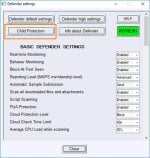
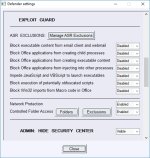
The ConfigureDefender utility is a GUI application for viewing and configuring important Defender settings on Windows 10/11. It mostly uses PowerShell cmdlets (with a few exceptions). Furthermore, the user can apply one of three predefined settings: Default, High, or Max. Applying settings requires restarting the computer.
High settings are recommended for most users.
The Max protection is mostly set to block anything suspicious via Attack Surface Reduction, Controlled Folder Access, SmartScreen (set to Block), and the 0-tolerance cloud level
.
ConfigureDefender utility is part of the Hard_Configurator project, but it can be used as a standalone application.

Some reviews:
Windows 10 Defender's hidden features revealed by this free tool (bleepingcomputer.com)
Windows Defender configuration tool ConfigureDefender 3.0.0.0 released - gHacks Tech News
 

Attachments

  • ConfigureDefender11.png
    ConfigureDefender11.png
    18.8 KB · Views: 1,983
  • ConfigureDefender21.png
    ConfigureDefender21.png
    24.4 KB · Views: 1,703
  • ConfigureDefender30.png
    ConfigureDefender30.png
    25 KB · Views: 1,667
Last edited:
Am I beating a irrelevant horse, or should everyone using Windows Defender also set Application Settings to (Allow from the Windows Store only).

For the record that doesn't mean you can never approve non WS apps, but a strong denial and essentially warning of non Windows apps are being installed.

*Always check every .exe with VirusTotal
 
Am I beating a irrelevant horse, or should everyone using Windows Defender also set Application Settings to (Allow from the Windows Store only).

For the record that doesn't mean you can never approve non WS apps, but a strong denial and essentially warning of non Windows apps are being installed.

*Always check every .exe with VirusTotal
Thanks, Andy!
Which settings, if any, would be applicable to people using a 3rd party AV?
 
Am I beating a irrelevant horse, or should everyone using Windows Defender also set Application Settings to (Allow from the Windows Store only).

For the record that doesn't mean you can never approve non WS apps, but a strong denial and essentially warning of non Windows apps are being installed.

*Always check every .exe with VirusTotal
This setting (Allow from the Windows Store only) is mainly equivalent to SmartScreen = Block.
One should understand that this setting allows running any application:
  • downloaded via Internet Downloader software,
  • embedded in archives (ZIP, 7-ZIP, ARJ, etc.)
  • from non-NTFS sources (pendrives, DVDs, ISO images, etc.)
So, one can be easily infected when opening the malicious document (DOC, RTF, PDF, etc.):
embedded script trojan downloader -> run downloaded malware.exe

Thanks, Andy!
Which settings, if any, would be applicable to people using a 3rd party AV?
I am afraid that those features (except SmartScreen and Hide Security Center) work only for Windows Defender.
 
Last edited by a moderator:
You are welcome.:)
Yet, Microsoft has to improve some features like 'Average CPU load while scanning' and 'Network Protection'.
They do not work on some computers. This issue was also commented by members on Wilderssecurity forum.
 
Last edited:
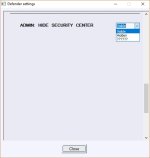
...think this only Hide WDSC. Right?

View attachment 178173
Yes. The setting ????? is only visible when one made some WDSC restrictions using reg tweaks or GPO.

Exploit Protection don't remember settings.
I set all to "Enable" after Refresh/Restart settings are back to "Disabled".

View attachment 178172
Thanks. Confirmed. I will correct this today.:)
In fact, the ASR settings are enabled, but ConfigureDefender when compiled for Windows 32-bit and ran on Windows 64-bit, shows wrongly that ASR is disabled. I did not notice this and pushed only one executable compiled for Windows 32-bit. I will upload ConfigureDefender for 64-bit Windows in an hour.

New link to ConfigureDefender ver. 1.0.0.1
ConfigureDefender/ConfigureDefender_1.0.0.1.zip at master · AndyFul/ConfigureDefender · GitHub
The file contains the ConfigureDefender_x32.exe (Windows 32-bit) and ConfigureDefender_x64.exe (Windows 64-bit).
 
Last edited by a moderator:
The importance of 'Cloud Protection Level' and 'Cloud Check Time Limit' can be seen here:
Detonating a bad rabbit: Windows Defender Antivirus and layered machine learning defenses
.
"If you are organization that is willing to accept a higher false positive risk in exchange for stronger protection, you can configure the cloud protection level to tell the Windows Defender AV cloud protection service to take a more aggressive stance towards suspicious files, such as blocking at lower machine learning probability thresholds. In the Tibbar example above, for example, a configuration like this could have protected patient zero using the initial 81% confidence score, and not wait for the higher confidence (detonation-based) result that came later. You can also configure the cloud extended timeout to give the cloud protection service more time to evaluate a first-seen threat.

As another layer of real-time protection against ransomware, enable Controlled folder access, which is one of the features of the new Windows Defender Exploit Guard. Controlled folder access protects files from tampering by locking folders so that ransomware and other unauthorized apps cant access them.

For enterprises, Windows Defender Exploit Guards other features (Attack Surface Reduction, Exploit protection, and Network protection) further protect networks from advanced attacks."
 
Works great.
This comment is about Office exploit protection in general, not about ConfigureDefender:
I have a certain Word add-on, "SaveReminder Ver 2.1.dotm", it lives in the Word startup folder in Appdata/Roaming/Microsoft. After enabling Office exploit protection, I got an error message when opening Word, saying that the file was blocked. Okay fine, but when I open the exceptions tab to fix the problem, I discover that the add-on file is gone entirely. It is not even in WD quarantine. Cute, huh?
 
Works great.
This comment is about Office exploit protection in general, not about ConfigureDefender:
I have a certain Word add-on, "SaveReminder Ver 2.1.dotm", it lives in the Word startup folder in Appdata/Roaming/Microsoft. After enabling Office exploit protection, I got an error message when opening Word, saying that the file was blocked. Okay fine, but when I open the exceptions tab to fix the problem, I discover that the add-on file is gone entirely. It is not even in WD quarantine. Cute, huh?
That is strange, it should be quarantined. It can be a Defender bug.