New Update Firefox Stable Release

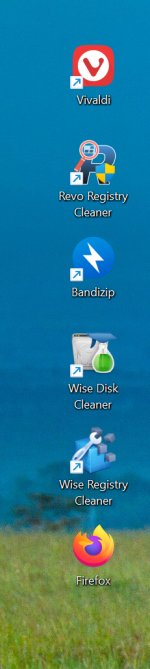
Has there been any change to the Firefox desktop shortcut? It no longer has the arrow like other desktop icons. 🤔

Screenshot 2025-12-14 174141.png
 
Last edited by a moderator:
I have version 146.0 with the arrow. This version resolved the blank taskbar icon for me that occurred when opening Firefox after a recent update.
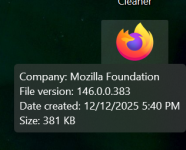
I also encountered the blank icon issue with the previous version, and it was resolved after updating to version 146.0. However, the arrow was still missing, so I reinstalled Firefox 146.0, and the icon is still without an arrow. It's not a shortcut like other applications, and this is what appears when I hover my mouse over it:

Screenshot 2025-12-14 210649.png
 
  • Like
Reactions: rashmi
Firefox 147.0 official release later today

  • WebGPU support is now enabled for devices with Apple Silicon processors on all supported macOS versions.
  • Firefox now supports Compression Dictionaries. This standard has already been adopted by several major sites and can significantly reduce the number of bytes transferred to load a page. This leads to faster page load times, particularly in limited bandwidth situations.
  • Improved video playback performance on systems with AMD GPUs by enabling zero-copy playback for hardware-decoded video where supported, bringing them to parity with Intel and NVIDIA GPUs.
  • Firefox now supports the Safe Browsing V5 protocol and is migrating from Safe Browsing V4 to the local list mode of Safe Browsing V5 protocol.
  • Users with Enhanced Tracking Protection (ETP) set to Strict will have local network access restrictions enabled by default. Firefox will now require users to explicitly allow public websites to access local network resources.
  • Firefox now allows you to customize your keyboard shortcuts to replace hard-to-type or hard-to-remember hotkeys, eliminate conflicts with other software, and create your preferred set. Access this experimental new feature by typing `about:keyboard` in the address bar.
  • A Picture-in-Picture player window can now optionally be opened automatically for a video playing in a tab when that tab goes into the background.
 
Firefox 147 Just Dropped: 5 Features That Make It Worth Updating Today
Not every monthly browser update feels like a milestone, far from it, but Firefox 147 is an exception to the rule. Released just a moment ago, on January 13, 2026, version 147 of the open source browser is not just another round of bug and security fixes — it is a comprehensive update that crosses some of the oldest items from the community’s wish list.

Whether you are a Linux user who has been waiting for 20 years for a cleaner home directory, a privacy advocate looking for improvements, or an AMD-GPU user who is now benefitting from decreased memory use and improved battery life during video playback.

Here are the five standout features in Firefox 147 that make this update essential.
  1. Closing a privacy loophole in Safe Browsing
  2. Site isolation support in Firefox for Android
  3. Local network protection in Strict Tracking Protection
  4. Zero-Copy Video benefitting video playback on AMD GPU systems
  5. XDG Base Directory Support
You can check out the full release notes of Firefox 147 here. There you also find a link to the included security fixes, which, fix several issues rate high or lower, but none that appears to be exploited in the wild already.
 
Firefox 147.0.1 probably coming soon, bug fixes as usual
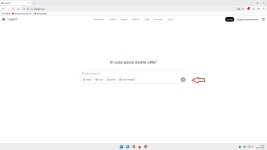
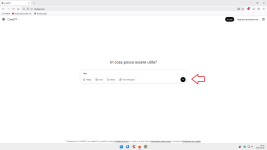
  • Fixed compatibility problems with websites that use the new Compression Dictionaries technology, such as ChatGPT, by temporarily disabling the feature.
  • Fixed an issue where an unnecessary empty directory was created on Linux systems.
  • Fixed an issue where time formats could cause certain websites to display incorrectly.
 
Firefox 147.0.2 will be released later today, including security fixes
  • Resolved various issues with missing or impaired browser functionality when using XDG Base Directories on Linux.
  • Fixed an issue causing excess passkey prompts to appear when logging into some sites
  • Fixed an issue that could lead to sites being incorrectly flagged as malicious by SafeBrowsing.
  • Various security fixes
 
Firefox 147.0.3 coming soon...
Release notes will be published later by Mozilla
New: Interoperability improvements for the CSS anchor positioning and Navigation web APIs.
  • Fixed a regression where position: sticky elements on some webpages could appear stuck or fail to update while mousewheel-scrolling after certain :hover interactions. (Bug 2010481)
  • Fixed an issue where the Firefox Developer Tools could fail to re-open after using the Inspector’s node picker and reloading a page containing cross-origin iframes. (Bug 2003810)
  • Fixed an issue where the DNS over HTTPS provider settings section could appear as a blank box, preventing users from seeing the current setting or changing it. (Bug 2010501)
  • Fixed an issue on Windows systems with a large number of fonts installed where parts of the Firefox UI (tabs, menus, and Settings) could display garbled characters or symbols instead of readable text. (Bug 2012950)
 
Last edited: