Serious Discussion Brave feature and settings review

oldschool

Level 85
Thread author
Verified
Top Poster
Well-known
High Reputation
Forum Veteran
Mar 29, 2018
8,388
1
61,272
8,369
Republic of Gilead, Russian Federation
en.wikipedia.org
As suggested by @uninfected1 I've created this seetings and feature thread. I'll update this thread with major Brave version/feature updates.
Current stable version is Brave v. 1.60.118
Brave is a privacy-friendly Chromium browser supported by optional Brave Ads and Brave Rewards with corresponding Crypto & Wallet features. Users may opt into viewing Brave Ads and receive BAT payments. This review is focused on setting up Brave as a privacy browser with most of those optional features disabled.

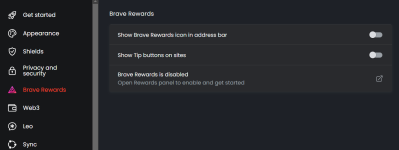
Note: Please no discussion of Brave Rewards in this thread!

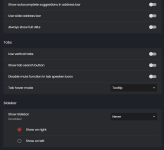
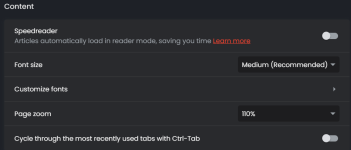
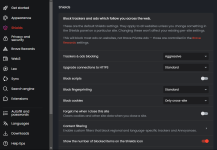
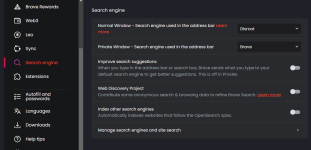
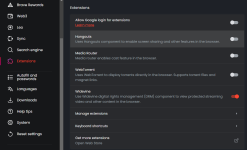
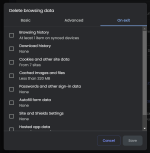
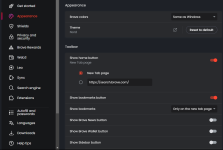
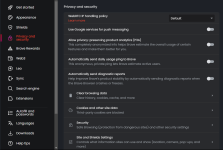
My privacy-focused settings are as follows:
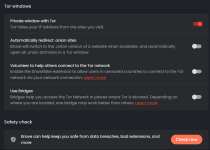
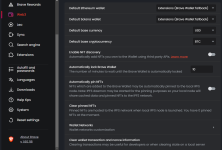
1700440451815.png1700440624888.png1700440693312.png
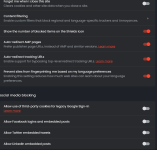
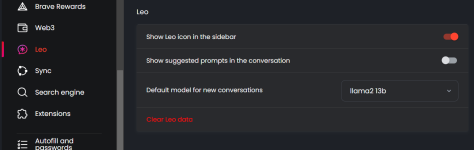
1700440775272.png1700440885022.png
-Global Shield settings for trackers, cookies, scripts, etc. are above and may also be controlled on a "per-site" basis via via the Shields address bar icon.
- Be aware that you may add additional filter lists in Shields Settings -> Content filtering (above) from the built-in list as well as custom filters of your choice.
- Also notice the relatively new "Forget me when I close this site" global setting (above) which clears cookies and other site data when you close a site.
1700440969455.png1700441084612.png
1700441151202.png
1700441237481.png
1700441329831.png
1700441398232.png
1700441492402.png
For more privacy Switch Widevine (DRM) setting Off if unneeded.
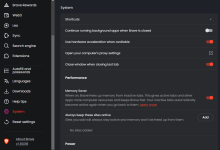
Widevine has the capability to create a unique device identifier and transmit it to Google. For more specific information on Widevine and privacy, see the Google privacy policy.
Source (Thanks to @Ink for reminding me! )

1700441630539.png
Energy Saver in System settings On/Off = your choice.
 
Last edited:
@oldschool thank you friend for posting your settings. I reviewed some YouTube videos a couple of weeks ago and some posts on this forum, but this makes it so much easier to follow and confirm things on my end. Thanks again :)
You're most welcome, my friend! (y):cool:
 
I'm getting re-familiarized with Brave and wondering about cookie management and the Forgetful Browsing feature. I haven't figured out if FB is useful to me, but I found this:
New cookies management on Brave beta
I use Brave beta V1.63.131.

I used to enter urls in the custom behaviors tab.

sites always allowed to use
after closing
and never

I have a large number of them and I’m happy with this system for authorizing certain cookies on sites I visit daily and disallowing others natively.
But I’ve just seen that this feature has disappeared. I still have a tab open on the brave://settings/cookies page to modify a domain upwards or downwards.
On my standard Brave V1.161.120 version, this feature is still available.
But I don’t understand Brave’s decision to remove the choice of adding, banning or closing domain names in order to manage the deposit of cookies yourself and not just third parties.
please enlighten me. Progress or not?
MattchesBrowser Support
6d

Yes, these were removed intentionally to get rid of redundancies. I believe we are also working on a hotfix so that the changes made in Shields are all reflected on that page (brave://settings/cookies) and easy to view.
You can still accomplish what you need to with Shields. For example, if you want to eliminate the possibility of being tracked entirely, from the first time you land on the site, I’d recommend the following:
  1. In Brave, change your Global Shields default (brave://settings/shields) value for Cookies to All — this will block all cookies on all sites by default (this is optional, Brave already blocks cross-site cookies by default, but this way you’ll be able to block everything initially and then pick and choose which sites you’d like to allow cookies on, as described below).
  2. For sites that you trust and want to allow cookies on, simply go to the URL, open the Shields panel and change the cookie setting to Allow all cookies or Block cross-site cookies (depending on your preference). Changes made in the Shields panel while on a particular website are applied only to that website and will persist.
  3. Unfortunately there is no per-site “clear on exit” option. However, there is a close approximation. For sites that you’d like to clear your data for when it’s closed, open the Shields panel and toggle the Forget me when I close this site option “on”. Now any data stored on the webpage your on will be deleted once the tab is closed.
Please let me know if you have any further questions.
 
Last edited:
I'm finding complaints about recent feature changes, including the ones by Brave in the above post about the confusion with managing cookies and the Forgetful Browsing feature. These two features seem to overlap in a sort of hybridized or confusing way, but I'm not sure.

What are your thoughts about them? And how do you configure them in Brave? 🤔

On another note, I found this complaint about Chrome/Chromium's new bookmarking feature, which requires more clicks. It is a PITA. The support team member opened an issue with Brave developers.
Thank you for reaching out and welcome to our Community.

I agree completely — this appears to be something inherited from the Chromium upgrade that came in the last browser update. I have opened the following issue for the developers to review and have included your thread in the issue:

 
Last edited:
I'm beginning to like Brave again. Regarding my above post, I see users need to make use of the address bar flyout to manage the per-site switches for cookies and device data. Check this if a site's data isn't being saved beside your global setting. I'm currently using the global Forgetful Browsing switch set to enabled, along with global "On-device site data" set to delete on close. I had to use the address bar flyout to deal with a couple of sites that weren't behaving.

Hope this helps anyone that might find the new Chromium/Brave settings a bit tricky, as I did. I suppose I can once again say "It's good to be Brave". :D
 
I wanna share my Brave flags. Would you?
Enabled:
#enable-webrtc-hide-local-ips-with-mdns
#disallow-doc-written-script-loads
#enable-tls13-kyber
#block-insecure-private-network-requests
#tab-groups-save
#enable-parallel-downloading
#strict-origin-isolation
#back-forward-cache
#third-party-storage-partitioning
#origin-agent-cluster-default
#origin-keyed-processes-by-default
#enable-isolated-sandboxed-iframes
 
  • Like
Reactions: TairikuOkami
I wanna share my Brave flags. Would you?
Enabled:
Be aware that Brave handles flags differently than other chromium browsers. Brave shows whether the flag is enabled/disabled by default, e.g. 3rd party storage partitioning is enabled by default so no need to change the flag.
 
I wanna share my Brave flags.
Code:
Disabled
brave://flags/#brave-ai-chat
brave://flags/#brave-commands
brave://flags/#brave-news-peek
brave://flags/#brave-rewards-gemini
brave://flags/#brave-speedreader
brave://flags/#brave-vpn
brave://flags/#brave-vpn-dns
brave://flags/#brave-wallet-bitcoin
brave://flags/#brave-wallet-zcash
brave://flags/#enable-nft-pinning
brave://flags/#enable-windows-gaming-input-data-fetcher
brave://flags/#media-route-dial-provider
brave://flags/#native-brave-wallet
brave://flags/#web-share
 
Here are the Apparmor profiles I'm using. They would have to be renamed without the .txt extension, then copied into the /etc/apparmor.d directory via sudo cp -i opt.brave* /etc/apparmor.d, enforced with sudo aa-enforce /etc/apparmor.d/opt.brave*, and probably not a bad idea to change file permissions with sudo chmod 644 /etc/apparmor.d/opt.brave*

Actually it's probably best to change the file permissions first.
 

Attachments

Just wanted to say thank you again @oldschool for this reference thread that keeps on giving (refreshing me as far as settings etc.) :) :)
I'm glad you find it useful. That's why I created the thread. (y) (y) :cool:
 
Last edited:
Is the following setting:
View attachment 285107
the same as selecting delete cookies on exit from the following setting:
View attachment 285108
UPDATE:

After testing for some time, I found the differences:
  • Delete cookies and other sites data on exit will delete all cookies and sites data stored in the browser when you close it.
  • Forget me when I close this site will just delete cookies and sites data from pages you visited after enabling this setting, previously visited sites cookies and data will not be affected unless you visited again.
 
I just skimmed thru the posts -- did not see a post about passwords (if I missed it sorry) Question: I login somewhere with a password, I get a popup from Brave asking me to save pw, I click never. I am not using browser pw managers, BUT in Brave settings I am not finding a way to DISABLE pw -- so is there a way to disable pw saving in Brave. I don't want to keep having to click "never" -- Please advise.

EDIT running linux if it makes a difference -- I want to disable "offer to save passwords" but not finding it in settings or flags?? chatGPT thinks this setting is in Brave??
 
Last edited: