


A default installation of Windows 11 includes dozens of Microsoft apps. Which ones are worth keeping, and which ones should you uninstall?

Which ones are worth keeping and which do you uninstall?None


I’m trying to return to the more neophyte understanding of computers while only retaining the safe habits. No need for tweaking or obsessing. My time is better spent elsewhere (definitely not on Linux).Which ones are worth keeping and which do you uninstall?
Answer: none
"He likes Linux"

You can carefully prep your setup, harden it and install all necessary applications and so on, then make a golden drive image. Then you can simply re-image with that golden image whenever you need a clean machine, no? No tradeoffs necessary.No need for tweaking or obsessing. My time is better spent elsewhere

I’ve done that. But usually by the time I actually need to reimage so much has changed it’s not that useful. Also I don’t care much about default installed apps. Just disable or hide what I don’t use as I go if it’s in the way. No fuss.You can carefully prep your setup, harden it and install all necessary applications and so on, then make a golden drive image. Then you can simply re-image with that golden image whenever you need a clean machine, no? No tradeoffs necessary.
Lol you know I couldn't resist. I do very much understand what you are saying. I run a Chromebook just for that reason. On days I do not want to sit at or have other things i wish to do, Chromebook is simple, straight forward, I get on, do what I need and log off. On days I feel like tweaking, learning or getting my geek on, I restore a tini file snapshot of my Linux lab and have at it. Best of both worlds really.I’m trying to return to the more neophyte understanding of computers while only retaining the safe habits. No need for tweaking or obsessing. My time is better spent elsewhere (definitely not on Linux).
Those are the very first to go, along with search and the recently added Copilot.Anything that appears in the taskbar like Team or Skype or OneDrive.
You guys got Copilot? I never got it.Those are the very first to go, along with search and the recently added Copilot.

Yes, it's in the Preview feature rollout. Disabled it via Group Policy. AI in Brave Search is enough AI for me.You guys got Copilot? I never got it.
Do you know which update brings it?Yes, it's in the Preview feature rollout. Disabled it via Group Policy. AI in Brave Search is enough AI for me.
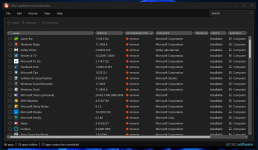
I got rid of the in-built and new apps, except for these few.A default installation of Windows 11 includes dozens of Microsoft apps. Which ones are worth keeping, and which ones should you uninstall?
What do you use to remove programs that Microsoft does not want you to remove?I got rid of the in-built and new apps, except for these few.
App Installer
Calculator
HEIF Image Extension
HEVC Video Extensions from Device Manufacturer
Microsoft Edge
Microsoft Store
Paint
Raw Image Extension
Store Experience Host
VP9 Video Extensions
Web Media Extensions
Web Image Extensions
Windows Notepad
Windows Security
Windows Web Experience Pack
Windows Terminal
Not certain as there were 3 Preview updates installed here beginning with the first on 3/1/24. You'd need to research it.Do you know which update brings it?
HiBit Uninstaller Portable Version https://www.hibitsoft.ir/Uninstaller.htmlWhat do you use to remove programs that Microsoft does not want you to remove?
I have all three installed and no signs of Copilot.Not certain as there were 3 Preview updates installed here beginning with the first on 3/1/24. You'd need to research it.
2024-02 Cumulative Update Preview for Windows 11 Version 23H2 for x64-based Systems (KB5034848)
2024-03 Cumulative Update Preview for Windows 11 Version 23H2 for x64-based Systems (KB5035942)
2024-04 Cumulative Update Preview for Windows 11 Version 23H2 for x64-based Systems (KB5036980)


